
My Recipe Box: My Cookbook
CmonAppFood & Drink
4.63.68K Reviews
- Version
- 8.9.5
- Installs
- 1.00M
- Age Rating
- Everyone
Screenshots
Our Review of My Recipe Box: My Cookbook
 Analysis by Appyee
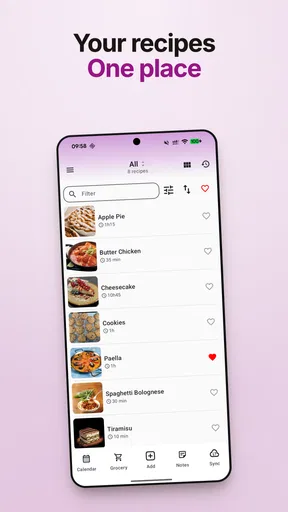
When I’m trying to decide what to cook, the hard part is often not finding another recipe; it’s remembering where I saved the one I already wanted to make. That is the problem My Recipe Box: My Cookbook is built to solve. I see it as a personal organizer for recipes gathered from different places, rather than a cooking course or a source of elaborate meal inspiration. That distinction matters: it is most useful when you have recipes worth keeping and want a repeatable way to find and use them.
A practical routine for collecting recipes
My most useful habit with a recipe keeper is to save a recipe as soon as I decide I might actually cook it, then give it enough attention to be useful later. A saved recipe is only a help if I can recognize it when I’m shopping or standing at the stove. With a collection built in My Recipe Box, I can keep recipes I find online alongside ones I write myself, instead of splitting them between browser bookmarks, screenshots, and scraps of paper.
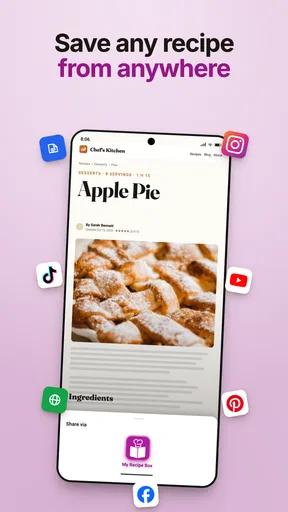
For example, if I see a promising soup recipe while browsing, I can use the sharing workflow to place it in my cookbook, then check that its ingredients and steps are clear enough for a future cooking session. I’d add a short identifying note when a recipe needs context, such as whether I want to try it for lunch or make it for guests, rather than assuming I’ll remember why I saved it. That small bit of organization pays off more than collecting dozens of recipes in a hurry.
The app is free to download and is made by CmonApp. It has a 4.6 average from around 45,000 ratings and has been installed over a million times. Those figures suggest it has found an audience, but they don’t tell me whether its approach suits every cook. I would judge it by whether keeping recipes in one place makes my own routine easier.
Building a cookbook that works in real life
For me, a recipe organizer earns its place when it helps at more than one point in the week. I might save a dish while browsing, choose it when planning meals, add what I need to the shopping list, and then use the recipe while cooking. My Recipe Box brings those tasks together in a way that can reduce the little bits of friction between “that looks good” and “dinner is ready.” It still depends on me keeping the collection tidy enough to navigate.
Getting Started with My Recipe Box
First things first, downloading the app is a breeze. Available for both Android and iOS, it’s just a few taps away from transforming your cooking experience. Once installed, opening My Recipe Box: My Cookbook feels like stepping into a cozy kitchen filled with culinary possibilities.
The app’s interface is super user-friendly. You’re greeted with a clean, intuitive dashboard that makes navigation a piece of cake. As someone who’s not exactly tech-savvy, I appreciated the simplicity right off the bat.
It is a free app for everyone, although it offers in-app purchases ranging from $0.99 to $29.99 per item. The current version is 8.7.6, and it requires Android 7.0 or later. I’d be comfortable trying the free version first and deciding whether the available paid options matter to my own use, rather than treating purchases as necessary to start organizing recipes.
Features That Spice Up Your Cooking
One of the coolest features is the ability to save recipes from anywhere. Found a killer lasagna recipe online? Just hit the share button and, voila, it’s saved in your personal cookbook. This app is like a digital treasure chest for all your culinary finds.
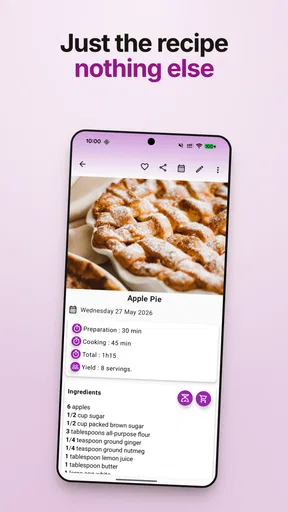
Not only can you save recipes, but you can also create your own. Have a secret family recipe for chocolate chip cookies? Add it to the app and keep it safe. The app lets you input ingredients, steps, and even upload photos, so it feels like a personalized cookbook.
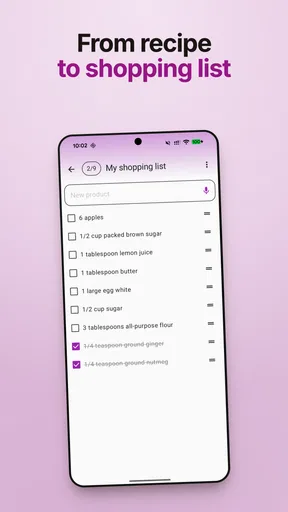
My Recipe Box also includes a handy shopping list feature. As you browse, you can add ingredients directly to your shopping list. This little detail is a game-changer for meal planning and grocery shopping.
Making saved recipes easier to use
A useful way to make the collection more dependable is to treat recipe entry as a quick editing pass, not just an import. I’d check that quantities and instructions came through in a readable order, and add a photo for a dish whose name alone won’t jog my memory. For a family recipe, entering the method in the same order I cook it can make the digital copy genuinely practical, rather than a transcription I still have to interpret.
The shopping list is most helpful when I use it before I leave home. I can review the ingredients for the meals I’ve chosen and catch missing basics while I still have time to adjust the plan. A trade-off is that a list only reflects what I add; I still need to think about what is already in the pantry and whether a recipe calls for an ingredient I can sensibly substitute. I wouldn’t expect the app to make those decisions for me.
For a realistic weeknight, imagine I’ve picked a pasta dish and a soup for the next few days. I can save both, put their needed ingredients on the list, and consult the steps when I’m ready to cook. That is a more useful workflow than searching online again at the store, especially if I have already made small adjustments to my own copy of a recipe. It also keeps meal planning grounded in dishes I know I might actually prepare, rather than an ambitious list of recipes I never revisit.
Cooking Together, Even When Apart
One of my favorite aspects is the community feature. You can share recipes with friends or family. It’s like having a global potluck, where everyone brings their best dishes to the table. This feature is perfect for those wanting to stay connected over a shared love for food.
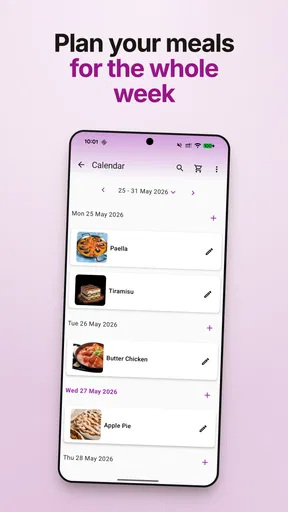
The app also offers a “Meal Planner” section. You can plan your meals for the week, ensuring you know exactly what’s on the menu. This has helped me stay organized and avoid the dreaded “What’s for dinner?” conundrum.
These tools are especially useful when the people sharing meals have different routines. I can keep a plan for the days I expect to cook, while using recipe sharing to pass along a dish a relative wants to try. I would still agree on practical details outside the recipe itself, such as who is buying ingredients or whether someone needs a substitution. The planner can make the menu visible, but it does not remove the everyday coordination that comes with cooking for other people.
Settings and habits worth checking
I’d start by looking through the app’s available settings and choosing only the options that solve a real annoyance. In a recipe collection, the best setup is usually the one that makes saved dishes easy to retrieve and keeps the steps comfortable to follow. I wouldn’t spend time customizing everything at once; I’d save a handful of recipes, try the shopping list and meal planner, then adjust my routine based on what I actually use.
There are also small habits that make a noticeable difference without relying on special features. I’d use recipe titles that distinguish similar versions, such as a quick weeknight curry versus a longer weekend version, and keep my own recipes updated after testing them. When I share something, I’d include enough context for the recipient to know why I’m sending it. These details help a cookbook stay useful as it grows.
Keeping It Fresh
One thing I’ve noticed is how regularly the app updates its content. There’s always something new to try, whether it’s a seasonal dish or a trendy new recipe. It keeps my culinary adventures fresh and exciting.
Plus, the app supports dietary preferences and restrictions. Whether you’re vegan, gluten-free, or just picky, you can filter recipes to fit your lifestyle. It’s like having a personal dietary assistant.
Dietary filters can narrow the search, but I’d still read each recipe carefully before cooking for someone with a restriction. Ingredients and preparation details matter, and a filter is a starting point rather than a guarantee that a dish meets every individual need. That cautious approach is particularly important when cooking for guests, where preferences and strict dietary requirements are not always the same thing.
Where this cookbook fits among alternatives
Compared with keeping recipes in browser bookmarks, My Recipe Box is better suited to someone who wants a dedicated place for saved and personally entered dishes, plus a route from recipes to a shopping list and meal planning. Bookmarks can be quicker if I only want to keep a link and rarely cook from it. A notes app can be more flexible for people who already organize everything there, but it may take more manual effort to keep ingredients and cooking steps consistent.
I’d skip this style of app if I prefer discovering every meal through a live recipe feed, or if I want detailed nutritional tracking and cooking guidance to be the main experience. A recipe box is strongest as an organizer; it cannot make a messy collection useful without some upkeep. People who cook the same few meals and already remember where everything is may also find that a separate cookbook app adds an unnecessary stop to their routine.
Advanced limits and everyday trade-offs
The biggest limitation I notice is a familiar one for any personal cookbook: saving a recipe is not the same as managing it well. If I import freely and never review the results, the collection can become a crowded pile of dishes I meant to try. I’d periodically remove recipes I no longer want and make sure the ones I rely on have complete instructions. That is a habit, not a glamorous feature, but it is what makes the app feel dependable.
I also wouldn’t assume that a recipe shared from a website will always arrive exactly as I want to cook it. Before relying on it, I’d review the ingredient list and directions, then correct or supplement my personal version where needed. This extra check is a small cost for having recipes gathered in one place, and it matters most for recipes with long instructions or unusual ingredient names.
For a cook who wants the app to make every decision, the planner and list may feel too hands-on. I still choose what to cook, judge what needs buying, and adapt recipes to my kitchen. For someone who likes that control and simply wants less searching and less paper, the balance makes sense.
Final Thoughts: A Kitchen Companion
Overall, My Recipe Box: My Cookbook is more than just an app; it’s a kitchen companion that grows with you. It’s perfect for anyone from seasoned chefs to kitchen novices. The combination of saving, creating, and sharing recipes makes it a must-have for food enthusiasts.
If you’re ready to revolutionize your cooking experience, give this app a whirl. It’s like having a little slice of culinary heaven in your pocket, always ready to inspire your next meal. Happy cooking!
Who I’d recommend it to
I’d recommend it to someone whose recipes are scattered across websites, notes, and family messages, and who wants a simple place to bring them together. It is also a good fit for a household that plans a few meals ahead and benefits from having a shopping list connected to the dishes. Its Everyone age rating makes it broadly accessible, though the real question is whether the person using it enjoys maintaining a digital collection.
My verdict is that this is a practical organizer, not a substitute for cooking judgment or careful recipe editing. If I build the habit of saving selectively, checking imported details, and planning from recipes I truly intend to make, it can earn a regular spot in my food routine. If I only want a quick link archive or prefer another tool for all my notes, I’d keep things simpler. For cooks who want their favorite recipes ready when it’s time to shop and cook, it is a sensible place to start.
Verdict
Strengths of My Recipe Box: My Cookbook
- User-friendly interface for easy navigation.
- Syncs recipes across multiple devices.
- Customizable categories for better organization.
- Offline access to saved recipes.
- Option to share recipes with friends.
Limitations of My Recipe Box: My Cookbook
- Limited free features in the basic version.
- No option for automatic ingredient scaling.
- Requires account creation for full access.
- In-app ads can be intrusive.
- Some features locked behind paywall.
Similar Picks in This Category
View All
Rappi: Food Delivery, Grocery
Rappi, Inc - Delivery3.5

McDonald’s: Cupons e Delivery
Arcos Dorados4.3

Swiggy: Food Instamart Dineout
Swiggy4.7

Blinkit: Groceries & more
Blinkit4.8

foodpanda: food & groceries
Foodpanda GmbH a subsidiary of Delivery Hero SE4.0

Zomato: Food Delivery & Dining
Zomato4.7
Frequently Asked Questions
What features does My Recipe Box: My Cookbook offer?
My Recipe Box: My Cookbook offers a range of features designed to enhance your cooking experience. Users can store and organize their favorite recipes, create shopping lists, and categorize dishes by meal type or cuisine. Additionally, the app allows you to adjust serving sizes and share recipes with friends and family.
Is My Recipe Box: My Cookbook available for both Android and iOS?
Yes, My Recipe Box: My Cookbook is available for both Android and iOS devices. You can download it from the Google Play Store for Android devices and the Apple App Store for iOS devices. The app offers a seamless experience across both platforms, ensuring accessibility for all users.
Does My Recipe Box: My Cookbook require an internet connection to use?
While an internet connection is needed to initially download the app and access certain features like sharing recipes online, many features of My Recipe Box: My Cookbook can be used offline. You can view saved recipes, adjust serving sizes, and plan meals without needing to be connected to the internet.
How user-friendly is the interface of My Recipe Box: My Cookbook?
My Recipe Box: My Cookbook is designed with user-friendliness in mind. The interface is intuitive, allowing easy navigation through categories and search functions. Users can quickly add or find recipes, and the clean design ensures that even those unfamiliar with technology can use the app effectively.
Are there any in-app purchases or subscriptions required in My Recipe Box: My Cookbook?
My Recipe Box: My Cookbook offers a free version with essential features. However, there may be optional in-app purchases or subscriptions that provide access to advanced features, such as additional recipe categories or personalized recommendations. Check the app's store description for detailed pricing and subscription information.
